

Customer support system
Section titled “Customer support system”In this tutorial you build a complete support-ticket system. It is for builders who have finished My First Application. Where My First Application had no process, this system routes every ticket through a five-step workflow, with notifications at each hand-over.
Time: about 3 hours. You need: Developer access, and the test accounts and group listed in Plan the system.
What you will build
Section titled “What you will build”A customer opens a ticket. The support desk — a team — picks it up and either closes it, answers it directly, or assigns it to a support representative. The representative works out a solution and sends it back to the desk for review. If needed, a manager approves the answer. The desk then sends the solution to the customer, who rates the service, and the desk closes the ticket. Everyone is notified when a ticket reaches them, and managers get a status chart and a monthly report.
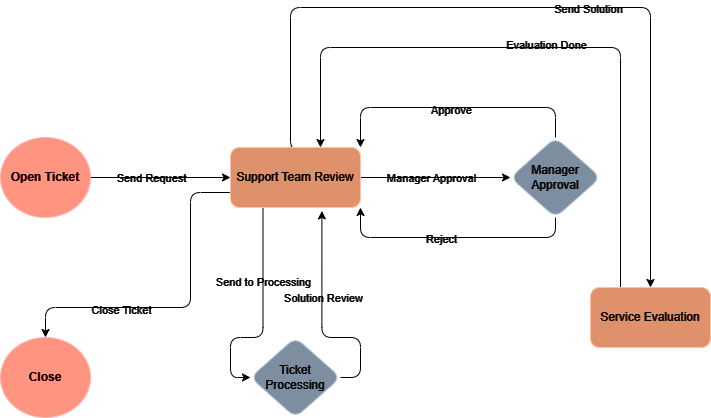
The people
Section titled “The people”| Role | In the system | What they do |
|---|---|---|
| Customer | Any signed-in user | Opens tickets, receives the solution, rates the service |
| Support desk | The Technical Support Office group | Routes tickets, reviews solutions, sends them, closes tickets |
| Support representative | The person in Assigned to | Works out the solution |
| Manager | A fixed person | Approves or rejects a solution when the desk asks |
Follow the build steps in order, starting with Understand the business need.
Platform 1.10.0 · Backend 1.11.0-alpha.11 · Frontend 1.11.0-alpha.6 · Mobile 1.10.2 · Chart 1.11.8 · Gateway 2.6.11 · MCP 0.2.0 · Grafana DS 1.2.0Docs build 2026-11-27